How to Use the dTWAP order on SpiritSwap

dTWAP powered by Orbs is a fully decentralized, permissionless, and composable DeFi protocol, developed by the Orbs team and powered by the Orbs network. By integrating the dTWAP protocol, SpiritSwap is the first DEX-AMM to introduce decentralized advanced trading orders to the DeFi space.
Even though TWAP is considered an advanced algorithmic trading order (especially in comparison to basic “swap” and “limit” orders), using this order type is relatively simple, as we’ll demonstrate shortly. All in all, traders should not be discouraged from taking advantage of this powerful tool to optimize their trading and reduce their order’s price impact on the market.
In this blog post we’ll cover the fundamentals of a dTWAP order, how to set up the order on the SpiritSwap UI, monitoring open orders, and more…
How to Set Up a dTWAP Order
dTWAP (Decentralized Time-Weighted Average Price) is a common algorithmic trading executing strategy that seeks to minimize a large order’s impact on the market by dividing it into a number of smaller trades and executing these trades at regular intervals over a specified period of time.
Using the dTWAP order, SpiritSwap’s users can now optimize their trading by executing more sophisticated trading strategies. These include, among other things, the ability to significantly reduce price impact when executing large orders or in cases of fragmented and low liquidity, automation of Dollar-Cost Averaging (DCA), and more.
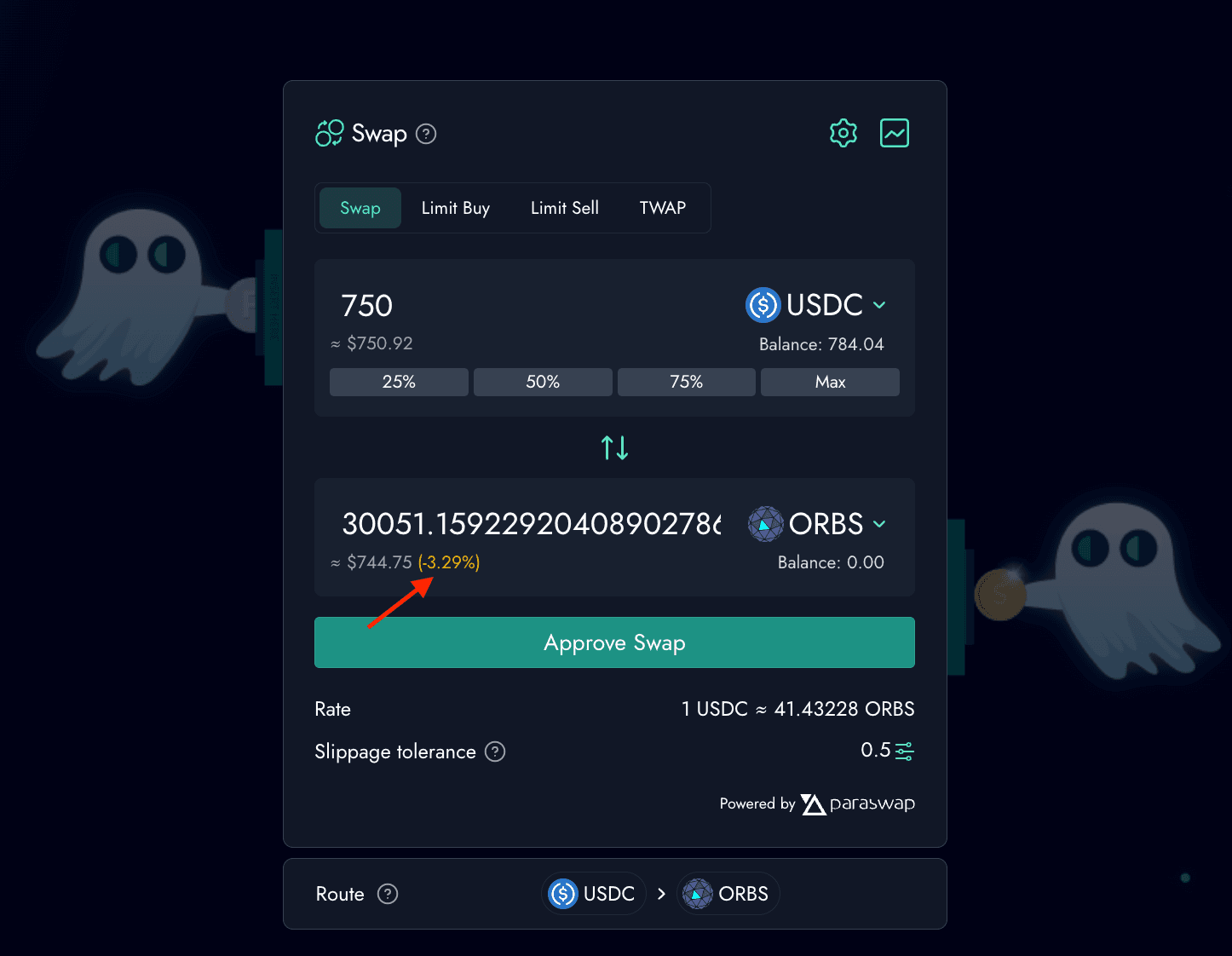
In this tutorial, we wish to swap $750 USDC tokens to ORBS tokens.
If we were to execute this trade using a swap order, we would have created a big price impact of -3.29%! Obviously this is unacceptable.
Let’s see how dTWAP can mitigate this and significantly reduce our trade’s price impact -
1. Choose From/to Tokens
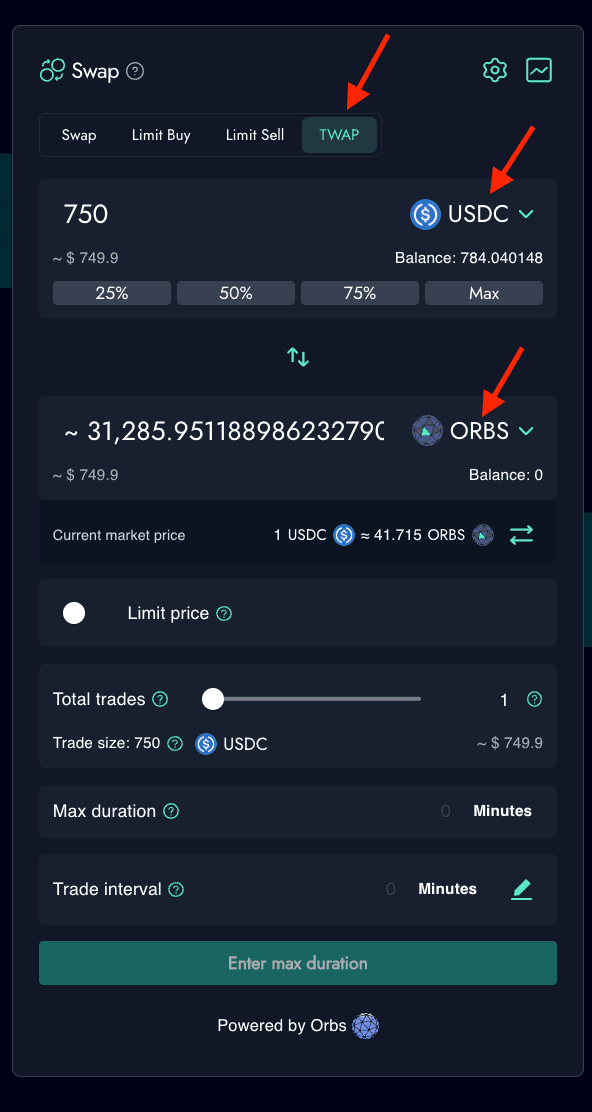
The dTWAP order can be accessed from the Swap Page in the SpiritSwap application. As with any order, the first step is to specify your source (USDC) and destination (ORBS) tokens to be traded.
2. Limit Price?
The next step is to decide if you want to make a “market” order or a “limit” order.
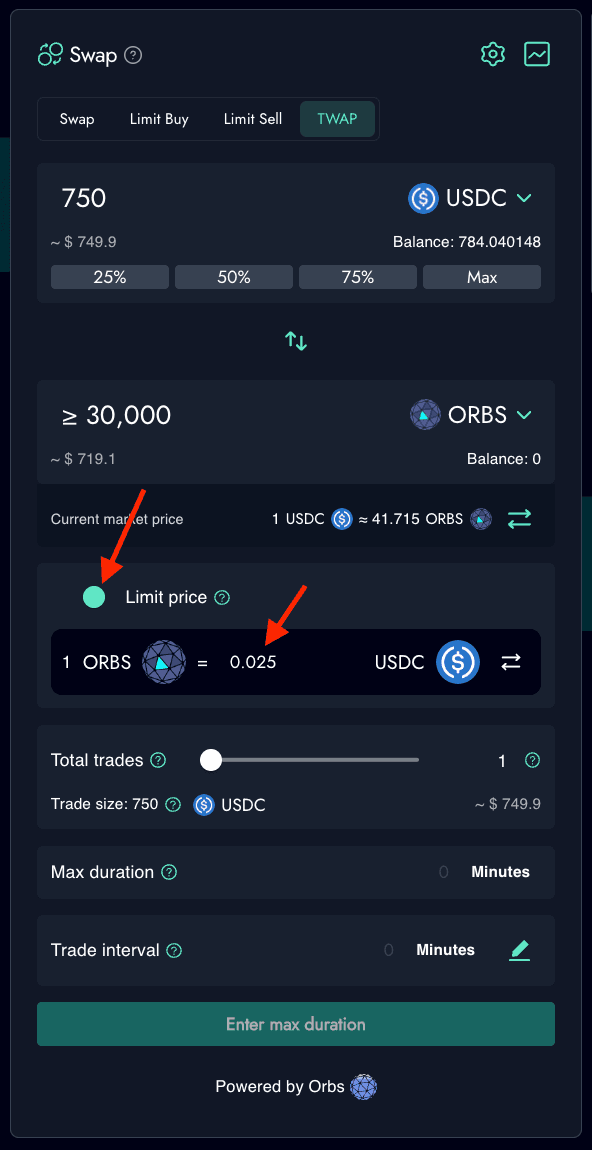
Users have the option to add a “limit price”, thereby turning their order into a limit order. If this option is not selected, the default is a market order with no constraint as to what price trades may execute.
- If a user selects the limit price option, a new field will open in which they can set the desired lowest price at which transactions will execute. Setting the limit price, as well as any changes to it, will also change the estimate in the “To” column to reflect the new limits.
- The limit price sets the lowest price for trades in your dTWAP order. Trades will ONLY be executed when this limit price is lower than or equal to the available market price. Some trades may not be executed if the limit price is better than the available market price and your order may only be partially filled.
In this example, we will specify a limit price of $0.025 ORBS, which means that the dTWAP protocol will execute trades only if the ORBS price is equal or better than $0.025.
3. Specify dTWAP parameters
The dTWAP UI has 3 basic parameters which the user needs to specify:
- Total Trades: The total number of individual trades that will be scheduled as part of your dTWAP order. Note that in limit orders, it is possible that not all scheduled trades will be executed. Note that individual trades must have a minimum trade size of $10 USD.
- Max. Duration: The maximum time during which the total amount of individual trades making up your full dTWAP order can be executed. Note that depending on your parameters, your order may be filled earlier than this time, partially filled or not filled at all.
- Trade Interval: This sets the minimum amount of time that will elapse between each individual trade in your dTWAP order. Note that if you choose to set this parameter manually, you will also need to set the trade size and duration manually as well.
These parameters allow for a lot of flexibility for the user when placing the order, taking into account factors such as market conditions, current gas fees, etc.
In our example we’ll specify the following parameters:
- Total Trades: 20
- Max Duration: 60 minutes
- As can be seen, the Trade Interval is automatically calculated to be every 3 minutes.
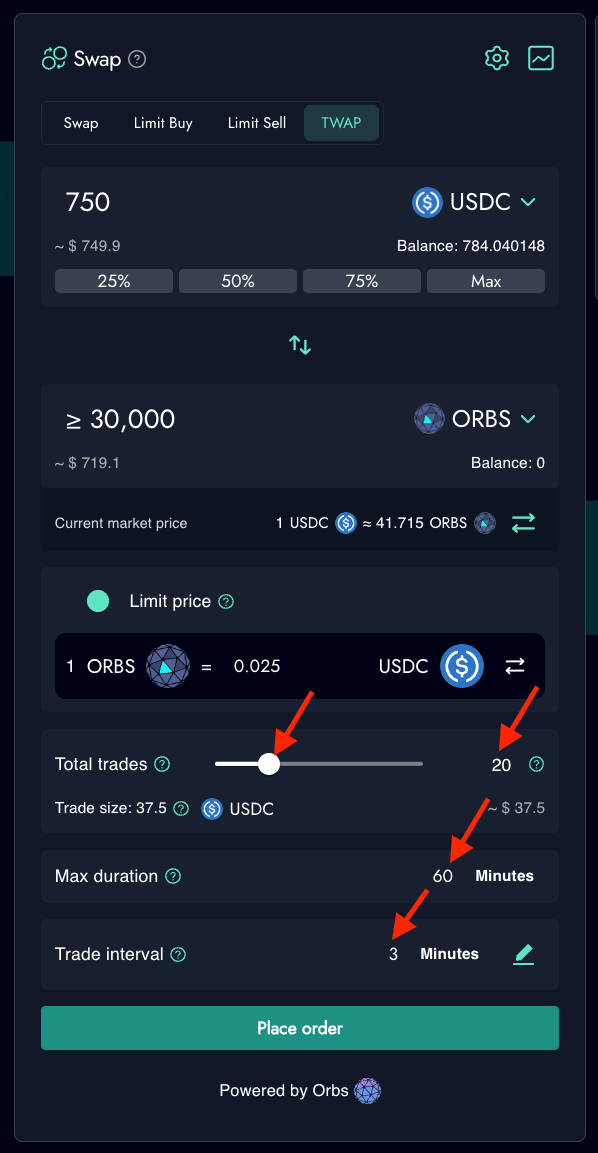
This means that the dTWAP order will break our trade into 20 individual swap orders of $37.5 USDC each, executed at regular intervals of 3 minutes.
In this way, the price impact of each individual trade is much lower than the full trade size. In addition, the interval between trades gives arbitrageurs a sufficient time window to close any price discrepancies on the affected pools and bring the reserves back to equilibrium (on par with spot price).
Note that, due to market fluctuations,the number of Orbs tokens received in return for the 37.5 USDC output may be different in each of the 20 trades.
4. Confirm to Execute
Once all of the above fields have been filled in - your order is ready to be executed!
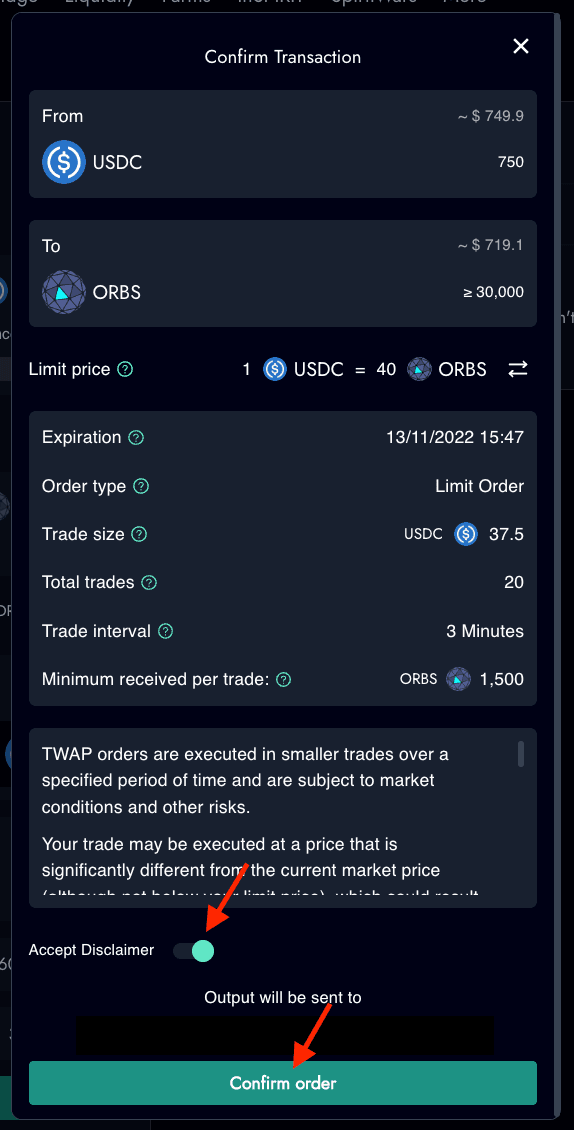
Press the “Place Order” button at the bottom of the screen and a pop-up window will emerge with the trade details summary. Once reviewed, confirm the trade and sign the transaction with your crypto wallet (such as Metamask).
Monitoring Open Orders
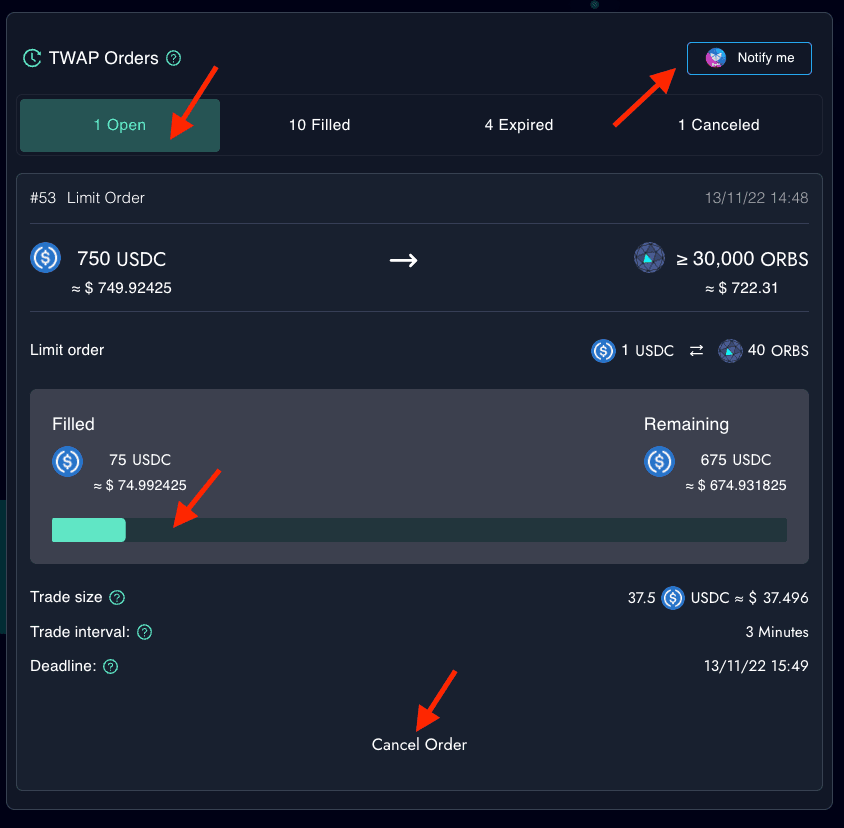
Users can continuously monitor their Open/Filled/Expired/Canceled dTWAP orders status in the SpiritSwap UI. Open orders can be canceled at any time by the user.
Users can also set up free, on-chain mobile notifications using the Open DeFi Notification Protocol powered by Orbs, for real-time notifications of their dTWAP order status.
Reliable Execution Powered by Orbs Layer 3
The Orbs Network is an open, decentralized and public blockchain infrastructure executed by a secure network of permissionless validators (known as “Guardians”) using Proof-of-Stake (PoS) consensus. Orbs is optimized to provide “L3” services, working in conjunction with existing L1 and L2 layers and acting as a “decentralized backend” that enhances the capabilities of EVM smart contracts. Orbs Network mainnet is live since 2019 and has dozens of active validators staked with over $100M.
The network provides its L3 services by operating as a decentralized serverless cloud that allows developers to design applications that extend the capabilities of their smart contracts without relying on traditional centralized server solutions. These applications are deployed to be executed by the Orbs Guardians in a decentralized way.
As part of the dTWAP protocol, Orbs Guardians will run a tailored function that acts as the single honest bidder that is required for the dTWAP protocol to run optimally and achieve prices that track the spot market price as closely as possible. The orders sent from the SpiritSwap UI will then be executed in a decentralized manner with the participation of the Orbs Network’s Guardians, who act as an honest bidder to ensure that the dTWAP orders are executed at an optimal price and at a fair fee (gas costs only).
Using dTWAP incurs no additional trading fees other than gas costs and the usual fees taken by SpiritSwap.